Design system pattern
/
Worked in partnership with a UI Designer and Product teams to audit, design, and document global search patterns.

Challenge
Create a single search pattern capable of scaling across multiple products and use cases, without bloating the UI or breaking accessibility.
Goal
Build a unified, scalable search & filter framework that helps multiple products reduce time-to-relevant-content, helping users confidently find their ideal EF program.
Objectives
Standardise discovery. Create unified experience for search and filter across 12+ global product teams.
Optimise performance and accessibility. Resolve API performance lags and accessibility challenges.
Ensure pattern flexibility. Create component-driven framework that eliminates component detachment and custom scripting.
Discovery
Across EF, 12+ autonomous product teams were building isolated search and filter features. This fragmentation created inconsistent search logic, broken accessibility, and duplicated engineering efforts across global domains.
To ensure scalability across diverse products, I categorised use cases and then partnered with engineering to lock in on word-matching, metadata conflicts, and search triggers upfront. Eliminating custom team variants and laying the foundation for full adoption across product teams.
Design
Challenge 1. Create a single search and filter component framework capable of scaling across both 'shallow' marketing pages and 'deep' multi-attribute product directories, without bloating the UI or breaking accessibility.
Solution. Design seperate Search and Filtering components with the capability to be coupled as a system. I had to ensure the pattern could scale seamlessly giving each product flexibility while enforcing system-wide visual and behavioural consistency (Fig.1).
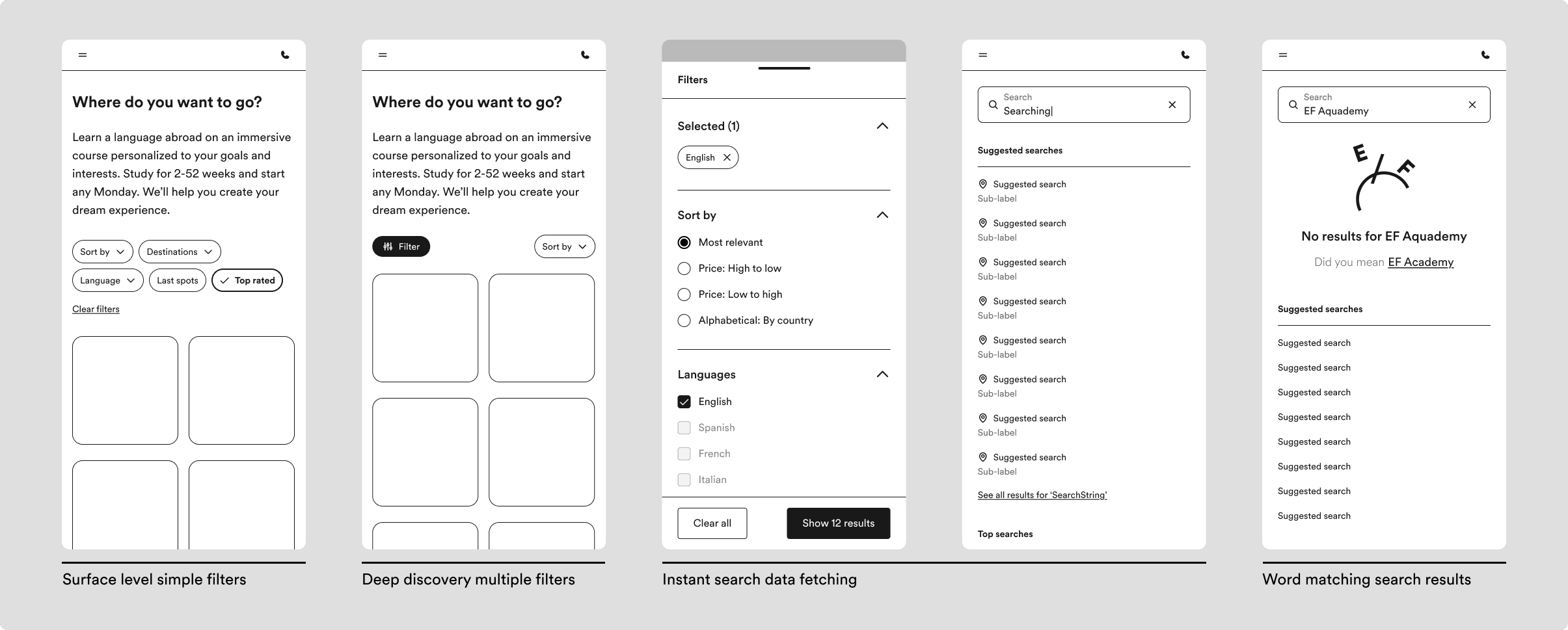
Fig.1 This framework allowed for early alignment with engineering on interaction rules for search triggers, submit logic vs. instant fetching, and word matching result thresholds.
Navigating technical trade-offs. Enabling instant results as the user was typing would trigger UI flickering and excessive server costs in low-bandwidth environments.
Challenge 2. Multi-select filters triggered too many API requests, causing screen flickering and heavy server load on slow connections.
Challenge 3. Instant text search fired an API call on every single keystroke, overloading backend services during active typing.
Solution. I added a batch filtering solution which would only fetch results when the user clicks ‘Apply’ and reserved the instant search as an option to maintain flexibility.
For the search bar I opted for a solution that implemented a 500ms debounce rate, ensuring the system only calls the API once the user stops typing (Fig.2).
Decision: Default to batch filtering & debounced search
By introducing batch filtering (explicit 'Apply' action) on mobile and a 500ms debounce on search inputs, we prevented premature API firing, reducing server load on low-bandwidth networks while delivering instant, lag-free results for millions of global users.
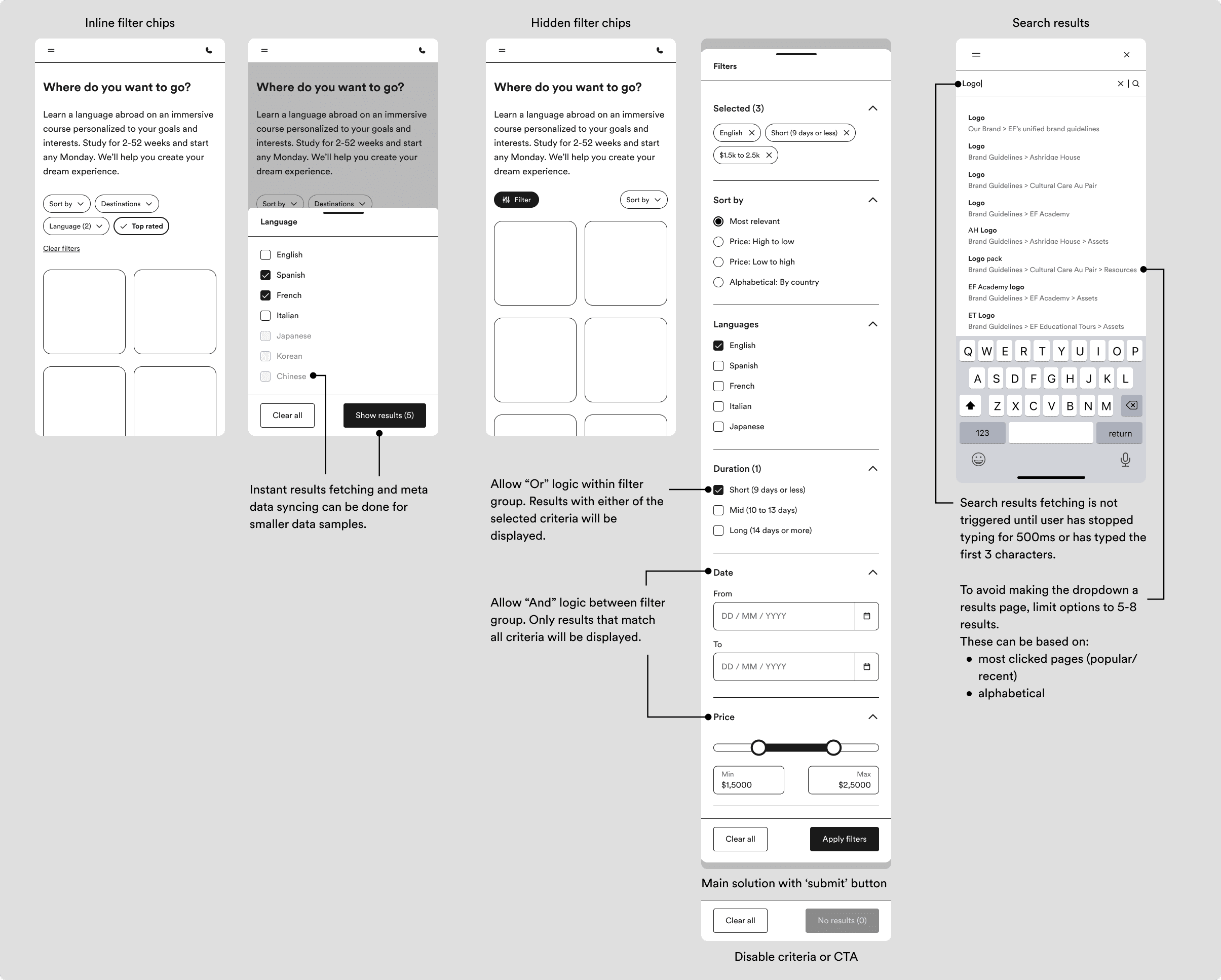
Fig.2 Balancing performance with interaction. Establishing 'And/Or' boolean logic and an explicit 'Apply' trigger for multi-select drawers to eliminate mobile layout shifts and reduce API load.
Challenge 4. Standard accessibility libraries, like Radix and React Aria, often struggle with the nuance of focus management in non-modal overlays.
Solution. I created a decision matrix that aligns focus and scroll behaviour with the user’s intent (Fig.3). By baking WCAG 2.1 AA directly into the component code and documentation, product teams no longer had to build custom accessibility workarounds. This directly resulted in 0% component detachment across all 12+ product teams.

Fig.3 Categorising interactions and use cases to solve the focus-trap for filter popovers. Further maintaining accessibility compliance without sacrificing the user’s ability to reference background content.
Impact
Rolling out a standardized discovery pattern across EF's global marketing properties eliminated the need for custom, team-by-team scripting. By baking WCAG AA accessibility, debounced search triggers, and batch-filtering logic directly into core components, product teams can now deploy high-performance search flows out-of-the-box.
Since launch, the discovery pattern has achieved widespread adoption across EF’s global digital teams, powering over 5,000+ live instances in Figma. Crucially, component analytics showed a 0% detach rate, proving that the modular architecture successfully accommodated complex global edge cases without sacrificing system integrity or WCAG AA compliance.
12+
product teams aligned
5,000+
live component instances
0%
detach rate