Screen reader simulator plugin

The semantic design & screen reader simulation engine for Figma.

The semantic design & screen reader simulation engine for Figma.

The semantic design & screen reader simulation engine for Figma.

Role

Role

Lead Product Desginer

Lead Product Desginer

/

Year

Year

2026

2026

/

Duration

Duration

Ongoing

Ongoing

Echo is a proactive Figma plugin that closes the 'semantic gap' between design and code. It enables designers to simulate the screen reader experiences during the design phase. Shifting accessibility upstream eliminates the guesswork and prevents costly technical rework.

Problem

Accessibility is a reactive 'check-the-box' task at the end of the development cycle

A reactive fix found during development or QA, leading to high rework costs and significant legal risks, because designers lack a native environment to check and document accessibility.

A reactive fix found during development or QA, leading to high rework costs and significant legal risks, because designers lack a native environment to check and document accessibility.

Solution

Allow designers to simulate screen reader behaviour and validate the focus orders

Allow designers to simulate screen reader behaviour and validate the focus orders

Allow designers to map WAI-ARIA 1.2 specifications directly onto Figma layers, while automating production-ready code snippets for seamless developer handoff.

Allow designers to map WAI-ARIA 1.2 specifications directly onto Figma layers, while automating production-ready code snippets for seamless developer handoff.

Objectives

  1. Align design intent with developer implementation.

  1. Automate accessibility compliance by leveraging design tokens.

  1. Reduce costs by fixing accessibility issues before development.

Discovery

Accessible components aren't enough to ensure a compliant user experience

Accessible components aren't enough to ensure a compliant user experience

With the European Accessibility Act (EAA) accessibility has shifted from a nice-to-have to a strict legal mandate. However, my research revealed that while our Design System components are compliant with WCAG 2.2 standards the final assembled pages often failed because the connective tissue, i.e. focus order, heading hierarchy, and some landmarks were never defined.


Interviews with engineers confirmed that the primary source of bugs was a design intent gap. Without a way for designers to define semantic logic onto the canvas, developers were forced to guess the design's intent. These guesses can lead to expensive handoff bounces back to design, inflating costs and delaying launches.

With the European Accessibility Act (EAA) accessibility has shifted from a nice-to-have to a strict legal mandate. However, my research revealed that while our Design System components are compliant with WCAG 2.2 standards the final assembled pages often failed because the connective tissue, i.e. focus order, heading hierarchy, and some landmarks were never defined.

Interviews with engineers confirmed that the primary source of bugs was a design intent gap. Without a way for designers to define semantic logic onto the canvas, developers were forced to guess the design's intent. These guesses can lead to expensive handoff bounces back to design, inflating costs and delaying launches.

Key findings

Key findings

  1. Missing holistic experience. Websites using the Design System are still failing, because the logic of the assembly is missing.

  1. Missing holistic experience. Websites using the Design System are still failing, because the logic of the assembly is missing.

  1. Design intent gap. Developers are guessing at semantic meaning, leading to a broken user expeirence.

  1. Design intent gap. Developers are guessing at semantic meaning, leading to a broken user expeirence.

  1. Legal risk. The EAA has transformed these gaps into high stakes legal liabilities.

  1. Legal risk. The EAA has transformed these gaps into high stakes legal liabilities.

Potential impact

Business

Business

IBM Cost of Quality model projects that we could save 80+ hours of engineering rework per feature by moving the semantic audit into the design phase.

User

User

Ensures a 1-to-1 fidelity between the designer’s intent and the user’s experience.

Ensures a 1-to-1 fidelity between the designer’s intent and the user’s experience.

Design

Bridging the gap between design intent and the engineering reality to minimise the need for costly rework

Bridging the gap between design intent and the engineering reality to minimise the need for costly rework

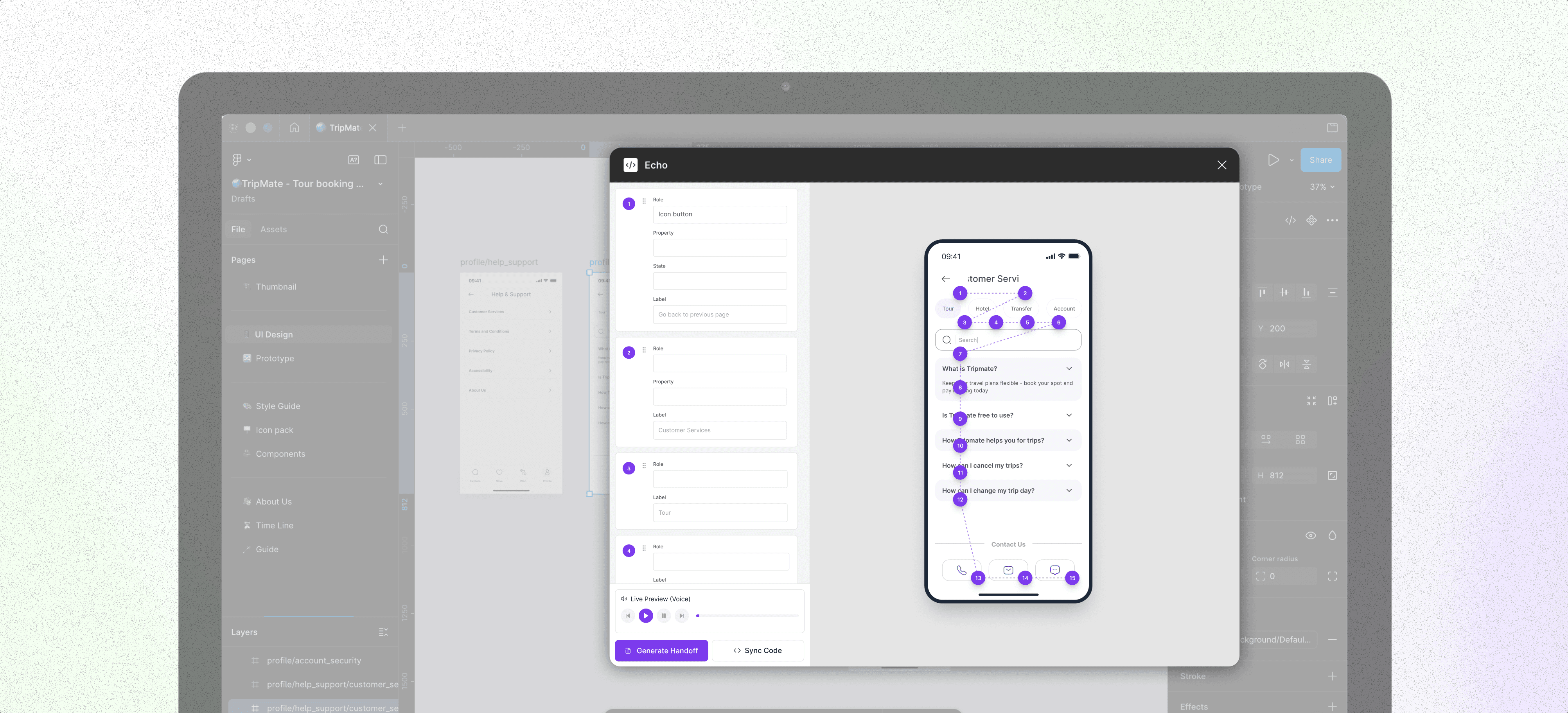
I created a Figma plug-in called Echo, which acts as the semantic layer between the Figma canvas and Dev mode. Echo allows designers to listen to their designs by simulating a screen reader, by automatically proposing a focus order, which the designer can then refine and generate hand off documentation with.


To ensure this effort translated into engineering efficiency, I utilised the Figma Plugin API to attach this metadata into the layers. This means the accessibility layer isn't just a separate document, it’s an embedded instruction manual. When a developer selects a component in Dev Mode, Echo serves up production-ready ARIA snippets, effectively automating the most error-prone part of the handoff (Fig. 1).

Fig.1 The Echo plugin acts as a bridge between the design and the final build, transforming intent into documentation and production-ready code snippets.

Challenge. The primary hurdle in automating this process is that Figma perceives layouts as a flat collection of shapes and text, lacking any inherent understanding of functional hierarchy. While I successfully piloted a hard-coded version using Figma Make (Fig. 2), scaling this into a dynamic tool revealed two critical architectural barriers:


  1. Token → ARIA mapping. Connecting the plugin to live Design System tokens to automatically infer ARIA roles (e.g., identifying a "Primary Button" component as a role="button").


  1. DOM syncing. Issues with rendering a real-time preview of the Figma frame within the plugin’s sandbox environment.

Fig.2 I used Figma Make to create the interface and the interactions, allowing a reading order preview on the side.

Next steps

Completion rate increased significantly and participant feedback was overwhelmingly positive

Completion rate increased significantly and participant feedback was overwhelmingly positive

AI Alt-Text: Exploring the integration of LLMs to suggest descriptive alt-text based on visual image analysis.


Design System Automation: Deepening the connection with W3C standard tokens to make accessibility 100% automated for teams using mature design systems.


Functional Beta: Refining the recursive "Reading Order" algorithm developed during the Cursor exploration for a full plugin release.

Following the redesign, I conducted a second task-based usability study to validate the design's ROI and mitigate launch risk. Participants described the new panel as "considered," "smooth," and "a pleasure to use".


The TCR for the key task (editing a section with flex layout) increased by 43%. Further for participants who previously completed the task saw a 9% reduction in time to completion.


I noted some users preferred old suboptimal settings due to habit, stressing the necessity of careful change management and avoiding unnecessary disruption to established workflows.