1
Website building tool


Website building tool: Achieving a 43% increase in key task completion rate establishing the foundation for productivity gains
Website building tool: Achieving a 43% increase in key task completion rate 43% establishing the foundation for significant future productivity gains
I initiated and led the redesign of a critical internal tool, a custom application called Site Builder, used by staff to build customer facing websites.
Research exposed a critical usability gap in the control panel that was driving excessive labor waste and by extension operational support costs. My goal was to transform the layout and organisation of the control panel to increase efficiency.
I initiated and led the redesign of a critical internal tool, a custom application called Site Builder, used by staff to build customer facing websites.
Research exposed a critical usability gap in the control panel that was driving excessive labor waste and by extension operational support costs. My goal was to transform the layout and organisation of the control panel to increase efficiency.
Role | UX Designer
Role | UX Designer
Team | Design & Development
Timeline | 4 Months
Timeline | 4 Months
Problem
Cluttered control panel meant high operational costs
Users were spending a huge amount of time building basic websites or fixing mistakes, costing the business time and resources.
Solution
Layout and naming consistency across the design panel
Drastically reduced the amount of time spent looking for the right settings, resulting in a more efficient and enjoyable experience for the user.
Objectives
Objectives
Objectives
Optimise the core task path to be faster and more direct, translating directly into time and labor cost savings for the business. (Task efficiency)
Simplify interface language to minimise the mental effort required to complete core tasks and ensure a reliable outcome.(Cognitive load & Errors)
Make complex features easy to understand, encouraging users to leverage the full power of the tool beyond basic tasks. (Learnability & Advanced usage)


Discovery
Inconsistent design panel obstructed the user’s ability to understand and utilise key functionality
I used a mixed-methods approach to uncover insights, starting with contextual inquiries with key stakeholders to define goals and uncover long standing issues.
The core of my research was a task-based usability study with 11 moderate to advanced users allowing me to observe frustration and pinpoint the exact source of inefficiency.
My research showed that user understanding is the key driver of satisfaction. My hypothesis was:
I used a mixed-methods approach to uncover insights, starting with contextual inquiries with key stakeholders to define goals and uncover long standing issues.
The core of my research was a task-based usability study with 11 moderate to advanced users allowing me to observe frustration and pinpoint the exact source of inefficiency.
My research showed that user understanding is the key driver of satisfaction. My hypothesis was:
Key findings
Key findings
Key findings
Disorganised layout. Unclear labels and inconsistent layout added minutes to basic tasks.
Unclear system feedback. Lack of clear feedback increased confusion and support inquiries.
High cognitive load. Reliance on memory for key workflows led to frequent mistakes and rework.
Clear panel layout → Increased ease of use → Increased Task Completion Rate → Reduced operational costs → Increased profitability
Design
Standardising the controls panel layout to tackle find-ability and setting's understanding
The core of the problem was that clutter and confusion lead to wasted time and failed tasks. My primary goal was to fix the fundamental structure.
HMW design a consistent panel to simultaneously reduce cognitive load for moderate users and ensure unhindered utility for advanced users?
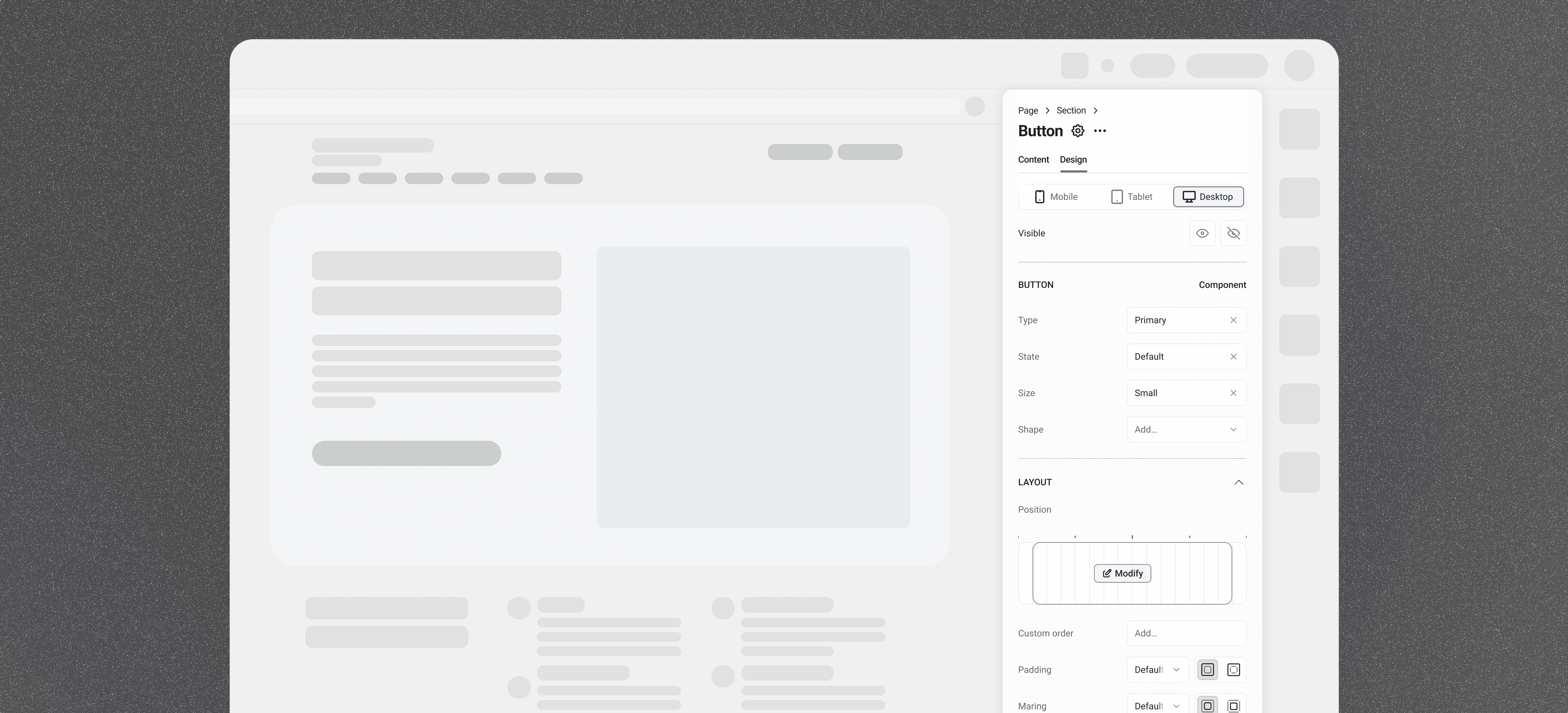
Streamlining the Information Architecture. I restructured the overwhelming list of settings into logically grouped categories (Fig. 1). This semantic grouping significantly reduced cognitive load and immediately established a predictable workflow. Further, renaming ambiguous settings (e.g., 'Variant' to 'Text style') minimised user guesswork, directly reducing time wasted.


Fig.1 Organising settings into logical, predictable groups established a consistent, scannable layout that reduced user guesswork.
To ensure we built the best solution possible within the CMS constraints, I evaluated three distinct strategies for managing the panel's complexity. We determined that splitting breakpoints (Fig 2.1) introduced too much cognitive friction for users, offsetting the potential reduction in error rate.
I immediately moved away from progressive disclosure pattern (Fig.2.2), recognising that hiding functionality would actively undermine the goal of increasing Advanced Feature Usage.
I therefore suggested we move forward with the strategy of combining settings (Fig.2.3), ensuring that any simplification maintained the necessary granularity for power users while reducing the total number of options presented.
To ensure we built the best solution possible within the CMS constraints, I evaluated three distinct strategies for managing the panel's complexity. We determined that splitting breakpoints (Fig 2.1) introduced too much cognitive friction for users, offsetting the potential reduction in error rate.
I immediately moved away from progressive disclosure pattern (Fig.2.2), recognising that hiding functionality would actively undermine the goal of increasing Advanced Feature Usage.
I therefore suggested we move forward with the strategy of combining settings (Fig.2.3), ensuring that any simplification maintained the necessary granularity for power users while reducing the total number of options presented.


Fig.2.1 Splitting ‘global’ and ‘local’ breakpoints to reduce rework
Pro: Eliminates accidental re-work
Con: New mental model increasing training costs
Fig.2.1 Splitting ‘global’ and ‘local’ breakpoints to reduce rework
Pro: Eliminates accidental re-work
Con: New mental model increasing training costs


Fig.2.2 Complex settings into an “advanced” tab to reduce cognitive load
Pro: Declutter for moderate users
Con: Hides crucial settings for advanced users
Fig.2.2 Complex settings into an “advanced” tab to reduce cognitive load
Pro: Declutter for moderate users
Con: Hides crucial settings for advanced users


Fig.2.3 Combining settings that do similar things for simplicity
Pro: Reduces number of options presented
Con: Sacrificing granularity and future conflicts
Fig.2.3 Combining settings that do similar things for simplicity
Pro: Reduces number of options presented
Con: Sacrificing granularity and future conflicts
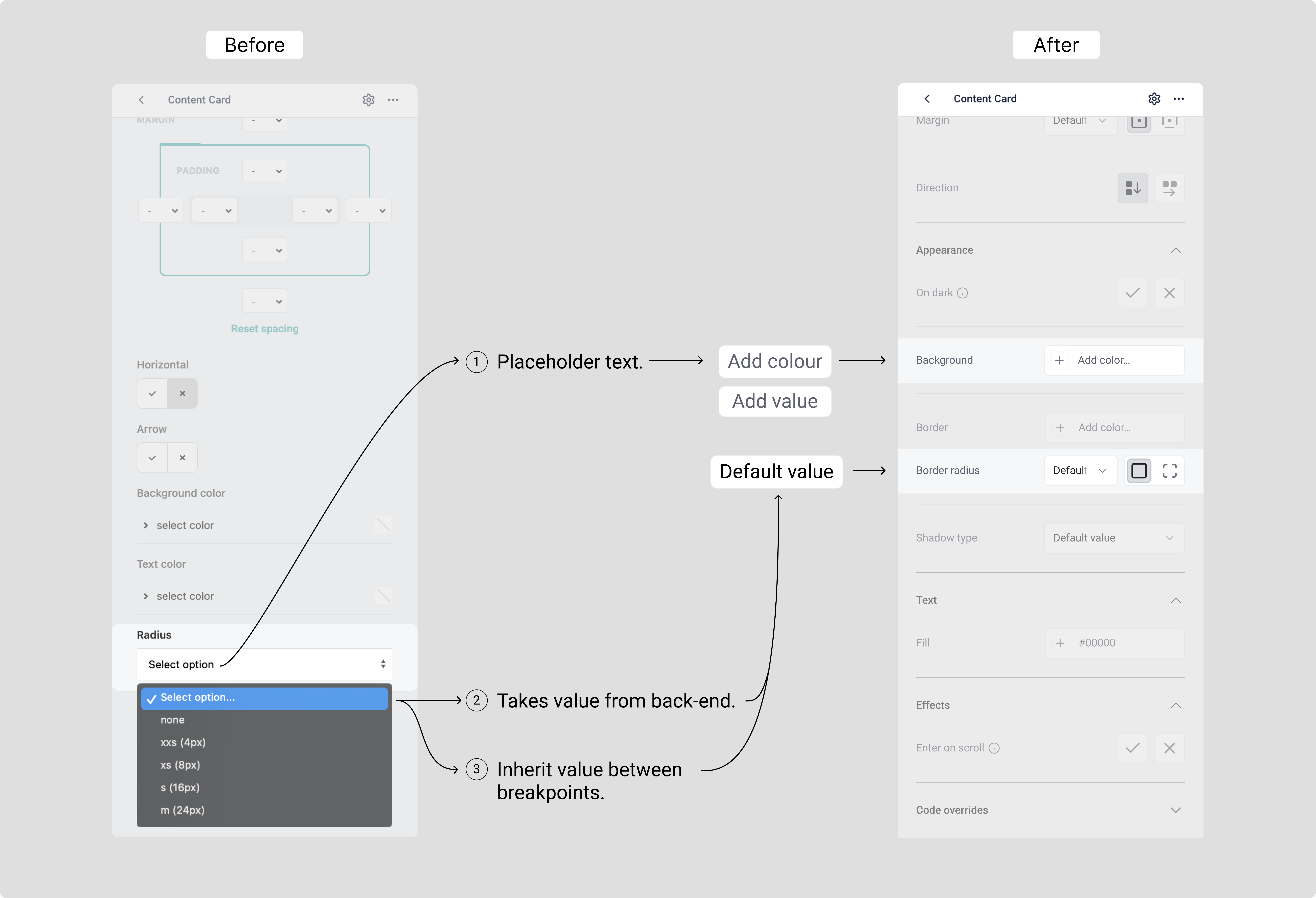
Navigating technical trade-offs. A core goal for improving understanding was to give users confirmation of settings they adjusted.
Challenge. Explicitly displaying these default values required hardcoding on the front-end. This rigidity would introduce technical debt, forcing separate front-end updates for every back-end change, sacrificing future development velocity.
Solution. I collaborated closely with the development team to implement a subtle "default value" label. This approach saved the team an estimated three weeks of engineering time. (Fig.3)
Navigating technical trade-offs. A core goal for improving understanding was to give users confirmation of settings they adjusted.
Challenge. Explicitly displaying these default values required hardcoding on the front-end. This rigidity would introduce technical debt, forcing separate front-end updates for every back-end change, sacrificing future development velocity.
Solution. I collaborated closely with the development team to implement a subtle "default value" label. This approach saved the team an estimated three weeks of engineering time. (Fig.3)
Strategic benefits
Strategic benefits
Strategic benefits
Engineering Win: No front-end code change needed for back-end default updates, maximising development velocity.
Business Win: Accelerated Time-to-Market by by reallocating resources to ship new features.
User Win: A more reliable system with a consistent flow of innovation.


Fig.3 Mitigating technical debt. This subtle design choice saved 3 weeks of engineering labor, directly contributing to the project's cost-saving objective.
TESTING
Completion rate increased significantly and participant feedback was overall positive
Following the redesign, I conducted a second task-based usability study with the same 11 participants to quantitatively validate the design's ROI and mitigate launch risk. This test focused on measuring the reduction in friction for high-cost workflows.
The TCR for the key task (editing a section with flex layout) increased by 43%. Further for participants who previously completed the task saw a 9% reduction in time to completion.
I noted some users preferred old suboptimal settings due to habit, stressing the necessity of careful change management and avoiding unnecessary disruption to established workflows.
Following the redesign, I conducted a second task-based usability study with the same 11 participants to quantitatively validate the design's ROI and mitigate launch risk. This test focused on measuring the reduction in friction for high-cost workflows.
The TCR for the key task (editing a section with flex layout) increased by 43%. Further for participants who previously completed the task saw a 9% reduction in time to completion.
I noted some users preferred old suboptimal settings due to habit, stressing the necessity of careful change management and avoiding unnecessary disruption to established workflows.
Key metrics
Key metrics
Key metrics
43% increase in Task Completion Rate (TCR)
9% reduction in Time on Task (ToT)
21% increase in Perceived Ease of Use (PEoU)
Participants described the new panel as "considered," "smooth," and "a pleasure to use".
Impact
Task Completion Rate soared by 43% establishing the foundation for significant future productivity gains
The strategic overhaul of the Site Builder was an investment in operational efficiency. By streamlining the core workflows, my design delivered measurable impact and ensured a more consistent, reliable product output across the business.
The 43% increase in TCR for high-friction tasks in the controlled usability test environment is a strong proof of concept demonstrating the potential labor savings. When a task fails, the user must restart, search for support, or hand the failure off to another team member. The higher task success rate proves the re-design has reduced this costly failure cycle.
The strategic overhaul of the Site Builder was an investment in operational efficiency. By streamlining the core workflows, my design delivered measurable impact and ensured a more consistent, reliable product output across the business.
The 43% increase in TCR for high-friction tasks in the controlled usability test environment is a strong proof of concept demonstrating the potential labor savings. When a task fails, the user must restart, search for support, or hand the failure off to another team member. The higher task success rate proves the re-design has reduced this costly failure cycle.
↑ increase in task completion
↓ reduction in time on a task
↑ increase in perceived ease of use
Further organisational value:
Reduced development support burden. Making the interface intuitive for non-technical users cut down on complex tool-related queries for the Engineering team. Saving high-value labor hours.
Standardised component handoff and accelerated implementation. The new categorisation of settings in the panel created a component taxonomy, paving the way to eliminating developer manual alignment to schema.
Further organisational value:
Reduced development support burden. Making the interface intuitive for non-technical users cut down on complex tool-related queries for the Engineering team. Saving high-value labor hours.
Standardised component handoff and accelerated implementation. The new categorisation of settings in the panel created a component taxonomy, paving the way to eliminating developer manual alignment to schema.
Retrospective
Prioritising behavioural data over stated preferences.
Interviews provided what users said, but task observation revealed what users did, exposing the true cost drivers. This validated our decision to focus on quantitative metrics, not just satisfaction scores.
Embedding technical feasibility in the design process
Close collaboration led to a major win where we balanced user outcomes without introducing technical debt, saving an estimated 3 weeks of engineering time (Fig. 3). This proactive approach ensures design decisions accelerate, rather than impede, development velocity.